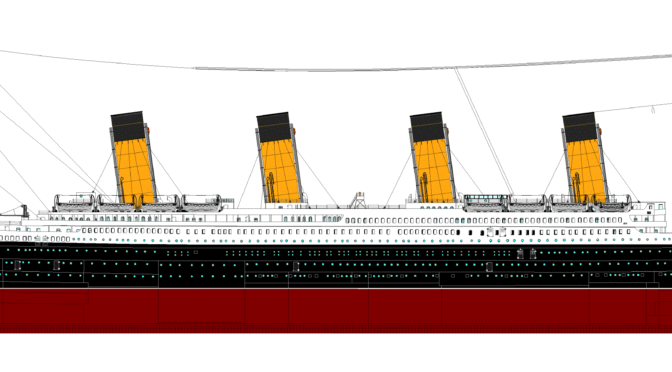
Few projects have ever taken on the fame and notoriety of that achieved by the Titanic and her sister Olympic ships, the Olympic and the Britannic, which began design one hundred and ten years ago this year. There are, of course, many lessons that we can learn from the fate of the Olympic ships in regards to project management and, in fact, there are many aspects of project management that are worth covering.
(When referring to the ships as a whole I will simply reference them as The Olympics as the three together were White Star Line’s Olympic Class ships. Titanic’s individual and latter fame is irrelevant here. Also, I am taking the position here that the general information pertaining to the Olympic ships, their history and fate are common knowledge to the reader and will not cover them again.)
Given the frequency with which the project management of the Olympics has been covered, I think that it is more prudent to look at a few modern parallels where we can view current project management in today’s world through a valuable historic lens. It is very much the case that project management is a discipline that has endured for millennia and many of the challenges, skills and techniques have not changed so much and the pitfalls of the past still very much apply to us today. The old adage applies, if we don’t learn from the past we are doomed to repeat it.
My goal here, then, is to examine the risk analysis, perception and profile of the project and apply that to modern project management.
First, we must identify the stakeholders in the Olympics project. White Star Lines itself (sponsoring company and primary investor) and its director Joseph Bruce Ismay, Harland-Wolff (contracted ship builder) with its principle designers Alexander Carlisle and Thomas Andrews, the ships’ crew which includes Captain Edward John Smith, the British government as we will see later and, most importantly, the passengers.
As with any group of stakeholders there are different roles that are played. White Star on one side is the sponsor and investor and in a modern software project would be analogous to a sponsoring customer, manager or department. Harland-Wolff were the designers and builders and were most closely related to software engineering “team members” in a modern software team, the developers themselves. The crew of the ships were responsible for operations after the project was completed and would be comparable to an IT operations team taking over the running of the final software after completion. The passengers were much as end users today, hoping to benefit from both the engineering deliverable (ship or software) and the service build on top of that product (ferry service or IT managed services.) (“Olympic”)
Another axis of analysis of the project is that of chicken and pig stakeholders where chickens are invested and carry risk while pigs are fully invested and carry ultimate risk. In normal software we use these comparatives to talk about degrees of stakeholders – those which are involved versus those that are committed, but in the case of the Olympic ships these terms take on new and horrific meaning as the crew and passengers literally put their lives on the line in the operational phase of the ships, whereas the investors and builders were only financially at risk. (Schwaber)
Second, I believe that it is useful to distinguish between different projects that exist within the context of the Olympics. There was, of course, the design and construction of the three ships physically. This is a single project, with two clear components – one of design and one of construction. And three discrete deliverables, namely the three Olympic vessels. There is, at the end of the construction phase, an extremely clear delineation point where the project managers and teams involved in the assembly of the ship would stop work and the crew that operated the ship would take over.
Here we can already draw an important analogue to the modern world of technology where software products are designed and developed by software engineers and, when they are complete, are handed over to the IT operational staff who take over the actual intended use of the final product. These two teams may be internal under a single organizational umbrella or from two, or more, very separate organizations. But the separation between the engineering and the operational departments has remained just as clear and distinct in most businesses today as it was for ship building and ferry service over a century ago.
We can go a step farther and compare White Star’s transatlantic ferry service to many modern software as a service vendors such as Microsoft Office 365, Salesforce or G Suite. In these cases the company in question has an engineering or product development team that creates the core product and then a second team that takes that in-house product and operates it as a service. This is increasingly an important business model in the software development space that the same company creating the software will be the ultimate operator of it, but for external clients. In many ways the relevance of the Olympics to modern software and IT is increasing rather than decreasing.
This brings up an important interface understanding that was missed on the Olympics and is often missed today: each side of the hand-off believed that the other side was ultimately responsible for safety. The engineers touted their safety of design, but when pushed were willing to compromise assuming that operational procedures would mitigate the risks and that their own efforts were largely redundant. Likewise, when pushed to keep things moving and make good time the operations team were willing to compromise on procedures because they believed that the engineering team had gone so far as to make their efforts essentially wasted, the ship being so safe that operational precautions just were not warranted. This miscommunication took the endeavor from having two types of systems of extreme safety down to basically none. Had either side understood how the other would or did operate, they could have taken that into account. In the end, both sides assumed, at least to some degree, that safety was the “other team’s job”. While the ship was advertised heavily based on safety, the reality was that it continued the general trend of the past half century plus, where each year ships were made and operated less safely than the year before. (Brander 1995)
Today we see this same problem arising between IT and software engineering – less around stability (although that certainly remains true) but now about security, which can be viewed similarly to safety in the Olympics’ context. Security has become one of the most important topics of the last decade on both sides of the technology fence and the industry faces the challenges created by the need for both sides to action security practices thoroughly – neither is capable of truly implementing secure systems alone. Planning for safety or security is simply not a substitute for enforcing it procedurally during operations.
An excellent comparison today is British Airways and how they approach every flight that they oversee as it crosses the Atlantic. As the primary carrier of air traffic over the North Atlantic, the same path that the Olympics were intended to traverse, British Airways has to maintain a reputation for excellence in safety. Even in 2017, flying over the North Atlantic is a precarious and complicated journey.
Before any British Airways flight takes off, the pilots and crew must review a three hundred page mission manual that tells them everything that is going on including details on the plane, crew, weather and so forth. This process is so intense that British Airways refuses to even acknowledge that it is a flight, but officially refers to every single trip over the Atlantic as a “mission”; specifically to drive home to everyone involved the severity and risk involved in such an endeavor. They clearly understand the importance of changing how people think about a trip such as this and are aware of what can happen should people begin to assume that everyone else will have done their job well and that they can cut corners on their own job. They want no one to become careless or begin to feel that the flight, even though completed several times each day, is ever routine. (Winchester)
Had the British Airways approach been used with the Titanic, it is very likely that disaster would not have struck when it did. The operational side alone could have prevented the disaster. Likewise, had the ship engineers been held to the same standards as Boeing or AirBus today they likely would not have been so easily pressured by management to modify the safety requirements as they worked on the project.
What really affected the Olympics, in many ways, was a form of unchecked scope creep. The project began as a traditional waterfall approach with “big design up front” and the initial requirements were good with safety playing a critical role. Had the original project requirements and even much of the original design been used, the ships would have been far safer than they were. But new requirements for larger dining rooms or more luxurious appointments took precedence and the scope and parameters of the project were changed to accommodate these new changes. As with any project, no change happens in a vacuum but will have ramifications for other factors such as cost, safety or delivery date. (Sadur)
The scope creep on the Titanic specifically was dramatic, but hidden and not necessarily obvious for the most part. It is easy to point out small changes such as a shift of dining room size, but of much greater importance was the change in the time frame in which the ship had to be delivered. What really altered the scope was actually that initial deadlines and projects had to be maintained, relatively strictly. This was specifically problematic because in the midst of Titanic’s dry dock work and later moored work, the older sibling, Olympic, was brought in for extensive repairs multiple times which had a very large impact on the amount of time in the original schedule available for Titanic’s own work to be completed. This type of scope modification is very easy to overlook or ignore, especially in hindsight, as the physical deliverables and the original dates did not change in any dramatic way. For all intents and purposes, however, Titanic was rushed through production much faster than had been originally planned.
In modern software engineering it is well accepted that no one can estimate the amount of time that a design task will take as well as the engineer(s) that will be doing the task themselves. It is also generally accepted that there is no means of significantly speeding up engineering and design efforts through management pressure. Once a project is running at maximum speed, it is not going to go faster. Attempts to go faster will often lead to mistakes, oversights or misses. We know this to be true in software and can assume that it must have been true for ship design as well as the principles are the same. Had the Titanic been given the appropriate amount of time for this process, it is possible that safety measures would have been more thoroughly considered or at least properly communicated to the operational team at hand off. Teams that are rushed are forced to compromise and since time cannot be adjusted as it is the constraint, the corners have to be cut somewhere else and, almost always that comes from quality and thoroughness. This might manifest itself as a mistake or perhaps as failing to fully review all of the factors involved when changing one portion of a design.
This brings us to holistic design thinking. At the beginning of the project the Olympics were designed with safety in mind: safety that results from the careful inter-workings of many separate systems that together are intended to make for a highly reliable ship. We cannot look at the components of a ship of this magnitude individually, they make no sense – the design of the hull, the style of the decks, the weight of the cargo, the materials used, the style of the bulkheads are all interrelated and must function together.
When the project was pushed to complete more quickly or to change parameters this holistic thinking and a clear revisiting of earlier decisions was not done or not done adequately. Rather, individual components were altered irrespective of how that would impact their role without the whole of the ship and the resulting impact to overall safety. What may have seemed like a minor change had unintended consequences that were unforeseen because holistic project management was abandoned. (Kozak-Holland)
This change to the engineering was mirrored, of course, in operations. Each change, such as not using binoculars or not taking ice bucket readings, were individually somewhat minor, but taken together they were incredibly impactful. Likely, but we cannot be sure, a cohesive project management or, at least, process improvement system was not being used. Who was overseeing that binoculars were used, that the water tests were accurate and so forth? Any check at all would have revealed that the tools needed for those tasks did not exist, at all. There is no way that so much as a simple test run of the procedures could have been performed, let alone regular checking and process improvement. Process improvement is especially highlighted by the fact that Captain Smith had had practice on the RMS Olympic, caused an at-sea collision on her fifth voyage and then nearly repeated the same mistake with the initial launch of the Titanic. What should have been an important lesson learned by all captains and pilots of the Olympic ships instead was ignored and repeated, almost immediately. (“Olympic”)
Of course ship building and software are very different things, but many lessons can be shared. One of the most important lessons is to see the limitations faced by ship building and to recognize when we are not forced to retain these same limitations when working with software. The Olympic and Titanic were built nearly at the same time with absolutely no time for engineering knowledge gleaned from the Olympic’s construction, let alone her operation, to get to be applied to the Titanic’s construction. In modern software we would never expect such a constraint and would be able to test software, at least to some small degree, before moving on to additional software that is based upon it either in real code or even conceptually. Project management today needs to leverage the differences that exist both in more modern times and in our different industry to the best of its advantage. Some software projects still do require processes like this but these have become more and more rare over time and today are dramatically less common than they were just twenty years ago.
It is well worth evaluating the work that was done by Harland-Wolff with the Olympics as they strove very evidently to incorporate what feedback loops were possible within their purview at the time. Not only did they attempt to use the construction of earlier ships to learn more for the later ones, although this was very limited as the ships were mostly under construction concurrently and most lessons would not have had time to have been applied, but far more importantly they took the extraordinary step of having a “guarantee group” sail with the ships. This guarantee group consisted of all manner of apprentice and master ship builders from all manner of support trades. (“Guarantee Group”)
The use of the guarantee group for direct feedback was, and truly remains, unprecedented and was an enormous investment in hard cost and time for the ship builders to sacrifice so many valuable workers to sale in luxury back and forth across the Atlantic. The group was able to inspect their work first hand, see it in action, gain an understanding of its use within the context of the working ship, work together on team building, knowledge transfers and more. This was far more valuable than the feedback from the ship yards where the ships were overlapping in construction, this was a strong investment in the future of their ship building enterprise: a commitment to industrial education that would likely have benefited them for decades.
Modern deployment styles, tools and education have led from the vast majority of software being created under a Waterfall methodology not so distinct from that used in turn of the [last] century shipbuilding, to most leveraging some degree of Agile methodologies allowing for rapid testing, evaluation, changes and deployment. Scope creep has changed from something that has to be mitigated or heavily managed to something that can be treated as expected and assumed within the development process even to the point of almost being leveraged. One of the fundamental problems with big design up front is that it always requires the customer or customer-role stakeholder to make “big decisions up front” which are often far harder for them to make than the design is for the engineers. These early decisions are often a primary contributor to scope creep or to later change requests and can often be reduced or avoided by agile processes that expect continuous change to occur to requirements and build that into the process.
The shipbuilders, Harlan and Wolff, did build a fifteen foot model of the Olympic for testing which is useful to some degree, but of course failed to mimic the hydrological action that the full size ship would later produce and failed to predict some of the more dangerous side effects of the new vessel’s size when close to other ships which led to the first accident of the group and to what was nearly a second. The builders do appear to have made every effort to test and learn at every stage available to them throughout the design and construction process. (Kozak-Holland)
In comparison to modern project management this would be comparable to producing a rapid mock-up or wireframe for developers or even customers to get hands-on experience with before investing further effort into what might be a dead end path for unforeseen reasons. This is especially important in user interface design where there is often little ability to properly predict usability or satisfaction ratings without providing a chance for actual users to physically manipulate the system and judge for themselves if it provides the experience for which they are looking. (Esposito)
We must, of course, consider the risk that the Olympics undertook within the context of their historical juxtaposition in regards to financial trends and forces. At the time, starting from the middle of the previous century, the prevailing financial thinking was that it was best to lean towards the risky, rather than towards the safe – in terms of loss of life, cargo or ships; and to overcome the difference via insurance vehicles. It was simply too financially advantageous for the ships to operate in a risky manner than to be overly cautious about human life. This trend, by the time of the Olympics, had been well established for nearly sixty years and would not begin to change until the heavy publicity of the Titanic sinking. The market impact to the public did not exist until the “unsinkable” ship, with so many souls aboard, was lost in such a spectacular way.
This approach to risk and its financial trade offs is one that project managers must understand today the same as they did over one hundred years ago. It is easy to be caught believing that risk is so important that it is worth any cost to eliminate, but projects cannot think this way. It is possible to expend unlimited resources in the pursuit of risk reduction. In the real world it is necessary that we balance risks with the cost of risk mitigation. A great example of this in modern times, but outside that of software development specifically, is in the handling of credit card fraud in the United States. Until just the past few years, it has generally been the opinion of the US credit card industry that the cost of greater security measures on credit cards to prevent theft were too high compared to the risks of not having them; essentially it has been more cost effective to spend money in reimbursing fake transactions than it was to prevent those fake transactions. This cost to risk ratio can sometimes be counterintuitive and even frustrating, but is one that has to drive project decisions in a logical, calculated fashion.
In a similar vein, it is common in IT to design systems believing that downtime is an essentially unlimited cost and to spend vastly more attempting to mitigate a downtime risk than the cost of the actual outage event itself would likely be if it were to occur. This is obviously foolish, but so rarely are cost analysis of this type run or run correctly it becomes far too easy to fall prey to this mentality. In software engineering projects we must approach risks in a similar fashion. Accepting that there is risk, of any sort, and determining the actual risk, the magnitude of the impact of that risk and comparing that against the cost of mitigation strategies is critical to making an appropriate project management decision in regards to the risk. (Brander 1995)
Also of particular interest to extremely large projects, of which the Olympics certainly qualified, there is an additional concept of being “too big to fail.” This, of course, is a modern phrase that came about during the financial crisis of the past decade, but the concept and the reality of this is far older and a valuable consideration to any project that falls onto a scale that would register a “national financial disaster” should the project totally falter. In the case of the Olympics the British government ultimately insulated the investors from total disaster as the collapse of one of the largest passenger lines would have been devastating to the country at the time.
White Star Lines was simply “too big to fail” and was kept afloat, so to speak, by the government before being forcibly merged into Cunard some years later. This concept, knowing that the government would not want to accept the risks of the company failing, may have been calculated or considered at the time, we do not know. We do know, however, that this is taken into consideration today with very large projects. An example of this happening currently is that of Lockheed Martin’s F-35 fighter which is dramatically over budget, past its delivery date and no longer even considered likely to be useful has been buoyed for years, but different government sponsors who see the project as too important, even in a state of failure to deliver, for the national economy to allow the project to fully collapse. As this phenomenon becomes better and better known, it is likely that we will see more projects take this into consideration in their risk analysis phases. (Ellis)
Jumping to the operational side of the equation we could examine any number of aspects that went wrong leading to the sinking of the Titanic, but at the core I believe that what was most evident was a lack of standard operating procedures throughout the process. This is understandable to some degree as the ship was on its maiden voyage and there was little time for process documentation and improvement. However this was the flagship of a long standing shipping line that had a reputation to uphold and a great deal of experience in these matters. It would also overlook that by the time that Titanic was attempting its first voyage that the Olympic had already been in service far more than enough to have developed a satisfactory set of standard operating procedures.
Baseline documentation would have been expected even on a maiden voyage, it is unreasonable to expect a ship of such scale to function at all unless there is coordination and communication among the crew. There was plenty of time, years in fact, for basic crew operational procedures to be created and prepared before the first ship set sale and, of course, this would have to be done for all ships of this nature, but it was evident that such operating procedures were lacking, missing and untested in the case of the Titanic.
The party responsible for operating procedures would likely be identified as being from the operations side of the project equation, but there would need to be some degree of such documentation provided by or coordinated with the engineering and construction teams as well. Many of the procedures that broke done on the Titanic included chain of command failures under pressure with the director of the company taking over the bridge and the captain allowing it, wireless operators being instructed to relay passenger messages as a priority over iceberg warnings, allowing wireless operators to tell other ships attempting to warn them to stop broadcasting, critical messages not being brought to the bridge, tools needed for critical jobs not being supplied and so forth. (Kuntz)
Much like was needed with the engineering and design of the ships, the operations of the ships needed strong and holistic guidance ensuring that the ship and its crew worked as a whole rather than looking at departments, such as the Marconi wireless operators, as an individual unit. In that example, they were not officially crew of the ship but employees of Marconi who were on board to handle paid passenger communiques and to only handle ship emergency traffic if time allowed. Had they been overseen as part of a holistic operational management system, even as outside contractors, it is likely that their procedures would have been far more safety focused or, at the very least, that service level agreements around getting messages to the bridge would have been clearly defined rather than ad hoc and discretionary.
In any project and project component, good documentation whether of project goals, deliverables, procedures and so forth are critical and project management has little hope of success if good communications and documentation are not at the heart of everything that we do, both internally within the project and externally with stakeholders.
What we find today is that the project management lessons of the Olympic, Titanic and Britannic remain valuable to us today and the context of the era whether pushing for iterative project design where possible, investing in tribal knowledge, calculating risk, understanding the roles of system engineering and system operations or the interactions of protective external forces on product costs are still relevant. The factors that affect projects come and go in cycles, today we see trends leaning towards models more like the Olympics than dislike them. In the future, likely, the pendulum will swing back again. The underlying lessons are very relevant and will continue to be so. We can learn much both by evaluating how our own projects are similar to those of White Star and how they are different to them.
Bibliography and Sources Cited:
Miller, Scott Alan. Project Management of the RMS Titanic and the Olympic Ships, 2008.
Schwaber, Ken. Agile Project Management with Scrum. Redmond: Microsoft Press, 2003.
Kuntz, Tom. Titanic Disaster Hearings: The Official Transcripts of the 1912 Senate Investigation, The. New York: Pocket Books, 1998. Audio Edition via Audible.
Kozak-Holland, Mark. Lessons from History: Titanic Lessons for IT Projects. Toronto: Multi-Media Publications, 2005.
Brown, David G. “Titanic.” Professional Mariner: The Journal of the Maritime Industry, February 2007.
Esposito, Dino. “Cutting Edge – Don’t Gamble with UX—Use Wireframes.” MSDN Magazine, January 2016.
Sadur, James E. Home page. “Jim’s Titanic Website: Titanic History Timeline.” (2005): 13 February 2017.
Winchester, Simon. “Atlantic.” Harper Perennial, 2011.
Titanic-Titanic. “Olympic.” (Date Unknown): 15 February 2017.
Titanic-Titanic. “Guarantee Group.” (Date Unknown): 15 February 2017.
Brander, Roy. P. Eng. “The RMS Titanic and its Times: When Accountants Ruled the Waves – 69th Shock & Vibration Symposium, Elias Kline Memorial Lecture”. (1998): 16 February 2017.
Brander, Roy. P. Eng. “The Titanic Disaster: An Enduring Example of Money Management vs. Risk Management.” (1995): 16 February 2017.
Ellis, Sam. “This jet fighter is a disaster, but Congress keeps buying it.”. Vox, 30 January 2017.
Additional Notes:
Mark Kozak-Holland originally published his book in 2003 as a series of Gantthead articles on the Titanic:
Kozak-Holland, Mark. “IT Project Lessons from Titanic.” Gantthead.com the Online Community for IT Project Managers and later ProjectManagement.com (2003): 8 February 2017.
More Reading:
Kozak-Holland, Mark. Avoiding Project Disaster: Titanic Lessons for IT Executives. Toronto: Multi-Media Publications, 2006.
Kozak-Holland, Mark. On-line, On-time, On-budget: Titanic Lessons for the e-Business Executive. IBM Press, 2002.
US Senate and British Official Hearing and Inquiry Transcripts from 1912 at the Titanic Inquiry Project.